Build it as you see it.
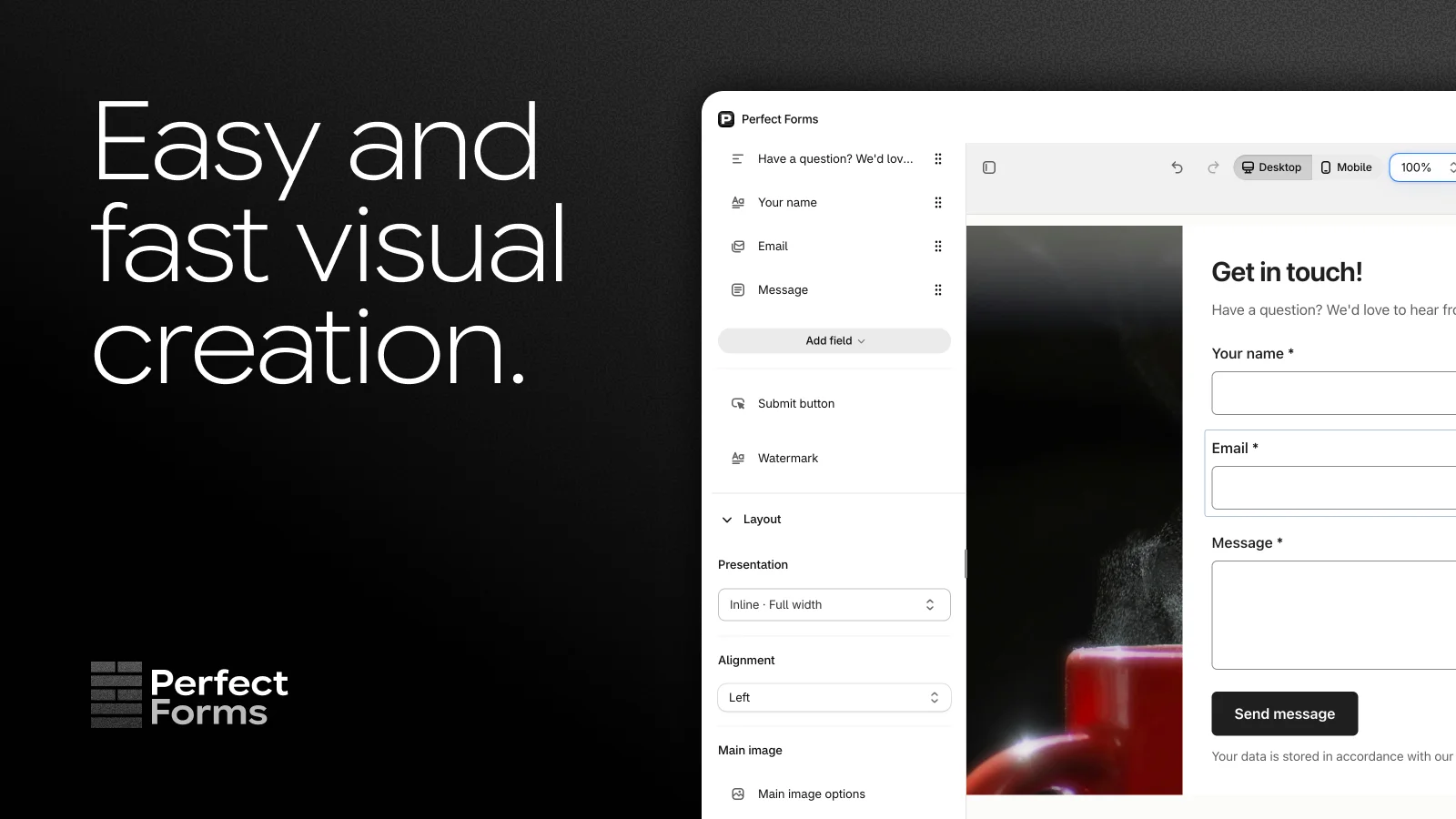
Arrange fields on a live canvas. Adjust fonts, colours, spacing and images. Switch between desktop and mobile previews as you go. You can also ask Shopify Sidekick to help build your form.
PERFECT FORMS / SHOPIFY FORM BUILDER

Perfect Formsby Merle Studio
A good form feels like part of your store. Build yours visually, collect the details that matter, and give every response somewhere useful to go.
Free plan available. Made by a small, independent studio.
01 / A LITTLE MORE CAPABLE
A visual form builder for the questions, requests and ideas your customers bring you.
Arrange fields on a live canvas. Adjust fonts, colours, spacing and images. Switch between desktop and mobile previews as you go. You can also ask Shopify Sidekick to help build your form.
Short and long text, email, numbers, dates, dropdowns, checkboxes and file uploads. Add headings, images and help text so every question has the context it needs.
Embed a form in a page, open it as a popup or give it a floating button. Place the Form app block wherever your Shopify theme supports app blocks.
View and search responses inside Shopify. Filter by answer or date, open attachments and export responses to CSV. Set up email alerts so your team knows when to take a look.
Connect submissions to Shopify Flow. Use the Form response submitted trigger to filter requests, notify your team and pass selected answers to compatible connected apps.
Bot protection is on by default. Add a consent checkbox when your form needs one, write clear help text and use custom CSS when you want finer control over the design.
02 / START WITH SOMETHING USEFUL
Practical guides, with field lists and setup steps you can use in your own store.
A better conversation starts with the right questions. Build a contact page that gives you enough context to help.
Photos, artwork, documents. Get the file and the request together, without another round of email.
Give prospective stockists a clear way in. Collect the details you need to decide whether you’re a fit.
Turn a submitted form into a useful next step, with the right answers reaching the right people.
An inline form, a well-timed popup or a quiet button in the corner. Choose the right invitation.
03 / ROOM TO GROW
Try the builder and collect your first responses on the free plan. Choose more room when you need it.
FREE
100 responses per month
STANDARD
1,000 responses per billing period
PLUS
10,000 responses per billing period
Response allowances are shared across your store’s forms. Paid plans are billed every 30 days; Plus also has usage charges. Prices shown in USD. See the Shopify App Store listing for current pricing and billing details in your currency.
04 / FROM IDEA TO STOREFRONT
Choose your fields, arrange them visually and set the style. Check the desktop and mobile previews.
Save and publish. Use Add to theme, then enter your Form ID in a Perfect Forms Form app block.
Submit a test from your store. Review the response in the app, then set up notifications or a Flow workflow.
Perfect Forms is a visual form builder for Shopify, made by Merle Studio. It helps merchants collect contact enquiries, files, wholesale applications, feedback and other requests through embedded forms, popups or floating buttons.
Yes. The free plan includes up to 100 responses per month, the visual builder, file uploads and custom styles. Free forms display a Perfect Forms watermark. Standard and Plus remove the watermark and include larger response allowances.
Yes. Add a File upload field for supported images and documents. Configure up to five files per field and up to 20 MB per file, within a total of ten files and 50 MB per response. Attachments are available from the authenticated response page.
Create a form, save and publish it, then choose Add to theme on its detail page. Place the Perfect Forms Form app block in a theme section that supports app blocks and paste in the Form ID. Save the theme and test a submission.
Yes. Install Shopify Flow and choose Perfect Forms’ Form response submitted trigger. Filter by the form you want to handle, then use the response details in conditions and actions. Files are represented by filenames and an authenticated response link.
Perfect Forms is built and supported by Merle Studio. Email hello@merle.studio with your store URL and a description of what you need. Our guides below cover setup, uploads, wholesale applications, popups and Flow.